Go Back
Last Updated :
Last Updated :
Dec 22, 2025
Dec 22, 2025

Form 8821 Guide for Founders: Authorize IRS Information Access
Form 8821 Guide for Founders: Authorize IRS Information Access
Navigating tax administration is a critical aspect for any founder running a startup, e-commerce business, or agency in the U.S. When managing your company’s bookkeeping and tax affairs, you may need to authorize trusted partners or professionals to access sensitive IRS information on your behalf. This is where Form 8821—the IRS Tax Information Authorization—comes into play. Understanding how to use this form effectively can save you time, reduce errors, and ultimately improve your business financial management.
At Haven, we equip founders like you with modern, startup-native bookkeeping, tax filing, and R&D tax credit strategies — all designed to give you confidence and control over your company’s finances.
What Is Form 8821 and Why It Matters for Founders
Form 8821 is an official IRS document that allows a taxpayer (your company) to authorize a third party (the designee) to receive and inspect confidential tax information. Unlike a power of attorney (Form 2848), it doesn’t give the designee authority to represent you before the IRS, negotiate, or make decisions—it simply grants access to IRS information, such as notices, transcripts, or account details.
For founders, this means you can officially empower your tax advisors, bookkeeping teams, or financial consultants to:
Access tax transcripts and IRS account information.
Receive copies of notices or letters from the IRS.
Monitor the status of tax filings and refunds.
Crucially, they cannot: make tax payments, file returns, or sign documents on your behalf. This makes Form 8821 an essential tool for maintaining control while enabling your team to stay informed and responsive.
Common situations where founders need Form 8821 include:
Authorizing your external CPA or bookkeeping service to view your company’s IRS records.
Allowing R&D tax credit consultants to verify past filings and credits claimed to maximize reimbursements.
Granting access to your agency's finance team or outsourced accounting operations for smoother audits or correspondence with the IRS.
For more details on how these processes integrate with our services, explore Haven’s services page.
Who Needs to File It?
The Taxpayer (the company or individual whose information is being released) is responsible for completing, signing, and submitting Form 8821. This is typically the business owner, a corporate officer, or a partner with legal authority to execute the form.
When Is Form 8821 Due?
Form 8821 is not a periodic tax return and does not have a statutory due date.
File as Needed: You file Form 8821 when you initially need to grant access, or when you need to change or revoke an existing authorization.
Validity: The authorization remains in effect until you revoke it, or until the IRS automatically terminates it when it considers the matter closed.
Timeliness: It is highly recommended to file Form 8821 before the third party needs to contact the IRS about your tax matters to avoid delays and ensure they have access to information when necessary.
How to Complete Form 8821: A Step-by-Step Guide for Founders
Filing Form 8821 might seem daunting, but the form itself is straightforward. Getting it right ensures smooth information flow with the IRS. Here’s a practical, guidance-oriented walkthrough aimed at startup leaders, focusing on the key lines.
Step 1: Identify the Taxpayer (Line 1)
This section identifies your company—the entity granting the authorization.
Guidance | What to Enter |
Taxpayer Name & Address: | Enter your legal business name exactly as it appears on your tax returns. |
TIN(s): | Provide your Employer Identification Number (EIN). If you are a sole proprietorship filing as an individual, use your Social Security Number (SSN). |
Phone Number: | A daytime phone number for the business (or the signing officer). |

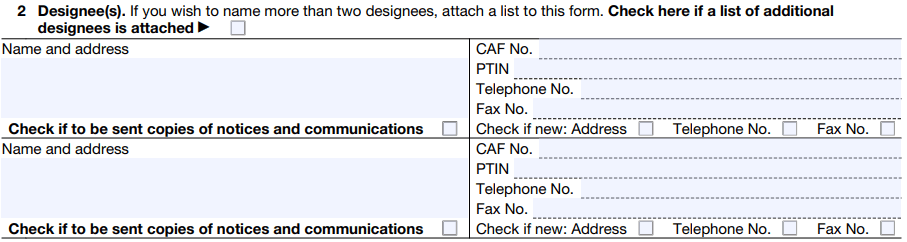
Step 2: Designate the Third Party (Line 2)
This section identifies who you are authorizing to receive your confidential information.
Guidance | What to Enter |
Name & Address: | The full name of the individual or organization being authorized (e.g., your CPA firm or bookkeeping service). |
CAF No. & PTIN: | The Centralized Authorization File (CAF) number is assigned by the IRS to tax professionals. Always ask your CPA/Advisor for their CAF number to speed up processing. Also include their Preparer Tax Identification Number (PTIN). |
Copy Checkbox: | Crucial: Check the box if you want the IRS to send copies of notices and communications to the designee. Founders usually check this for their tax professional. |
Pro Tip: If you need to name more than two designees, check the box at the top of Line 2 and attach a supplemental list.
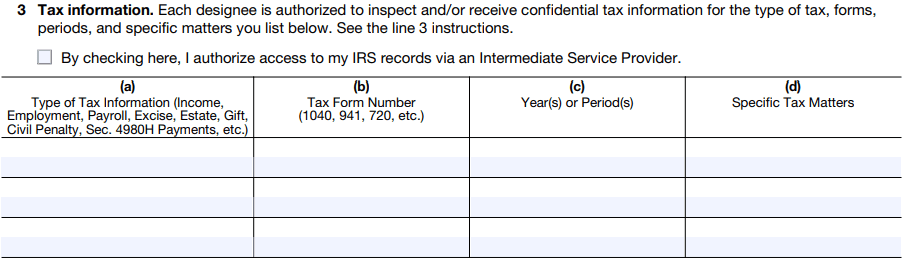
Step 3: Specify the Tax Matters and Tax Years (Line 3)
This is the most important section for limiting the scope of access. You must be specific about what information can be shared and for when.
Column | Guidance & Founder Focus |
(a) Type of Tax Information | State the category (e.g., Income, Employment, Civil Penalty). |
(b) Tax Form Number | Clearly indicate the specific form (e.g., Form 1120 for corporate income tax, Form 941 for payroll, Form 6765 for R&D credit). |
(c) Year(s) or Period(s) | Be Precise. Enter specific years (2022, 2023) or periods (e.g., 2023 Q1, Q2, Q3, Q4 for payroll taxes). Do not use "All." |
(d) Specific Tax Matters | Use this for specific issues like "Audit of 2022 Form 1120" or "R&D Tax Credit verification." Leave blank if authorizing general access. |
Step 4: Duration and Revocation (Lines 4 & 5)
Line 4 (Specific Use): Check this box only if the authorization is for a specific, one-time use that the IRS will not record on its Centralized Authorization File (CAF). If checked, this authorization does not revoke prior ones, and you skip Line 5.
Line 5 (Retention/Revocation): By default, filing a new Form 8821 automatically revokes all prior Forms 8821.
To retain an old authorization: Check the box on Line 5 and attach a copy of the authorization(s) you wish to keep in effect.
Step 5: Signature and Submission (Line 6)
The form must be signed and dated by the person legally authorized to act for the business (e.g., CEO, Partner).
Signature Requirement:
Mail/Fax: Requires a wet (handwritten) ink signature. Digital or typed signatures are not valid for these methods.
Online: Electronic signatures are accepted when submitting the form through the IRS's official online service.
How to Submit (The Filing Options):
Online (Recommended for Speed): Submit securely via the IRS Tax Pro Account or the Submit Forms 2848 and 8821 Online tool at IRS.gov/Submit8821. This offers the fastest processing and instant confirmation.
Fax or Mail: Mail or fax the completed form to the IRS office that corresponds to your geographical location. The specific address depends on your state of residence/principal business (check the latest instructions for the precise address and fax number).
Common Mistakes Founders Make on Form 8821
Avoid having your form rejected or delayed by steering clear of these common pitfalls:
Mistake | Impact | Guidance to Avoid |
No Signature or Date (Line 6) | Automatic rejection. The authorization is invalid. | Ensure the authorized officer signs and enters the current date. |
Wrong Taxpayer ID | Cannot match the form to the business’s IRS account. | Use the correct EIN (or SSN) that corresponds to the legal name on Line 1. |
Using Broad Terms for Tax Periods (Line 3) | Grants unlimited access, which may expose more information than intended. | Write specific year(s) or quarter(s). Never write "All." |
Missing CAF Number for Designee | Causes significant delays in processing since the IRS cannot easily link the designee to the Centralized Authorization File. | Request the designee's CAF number before filling out the form. |
Electronic Signature on Fax/Mail | The form will be rejected. | If faxing or mailing, the signature must be original/wet ink. |
Best Practices for Founders When Managing IRS Authorizations
Treat IRS authorizations like Form 8821 with deliberate care to maintain security and compliance while equipping your team to work effectively.
Best Practice | Explanation | Founder Benefit |
Limit the Scope | Only authorize necessary tax types, forms, periods, and parties (Line 3). | Minimizes risk of overexposure of sensitive data. |
Review Regularly | Update or revoke authorizations as teams and partnerships change. | Avoids stale authorizations that grant access to former consultants. |
Secure Copies | Retain signed forms in your company’s secure document systems. | Ensures documentation is available for audits or compliance reviews. |
Communicate Clearly | Notify third parties about their authorization limits and durations. | Prevents misunderstandings around permissions and responsibilities. |
Understand the Tool | Know the distinction between Form 8821 (Info Only) and Form 2848 (Representation). | Grants your team the right level of access and legal authority. |
Founders who integrate Form 8821 management into their regular financial governance reduce the chance of costly delays and improve coordination with tax professionals.
FAQs
What if my tax professional’s address changes?
A new Form 8821 is not required. The designee only needs to send a signed, dated written notification of the new address to the IRS office where the original Form 8821 was filed.
How do I revoke a Form 8821?
Submit a new Form 8821 stating "Revoke" across the top, or send a signed statement of revocation to the same IRS office where the original was filed. Be sure to send a copy to the designee as well.
Can I authorize access to past tax years?
Yes, you can authorize access for any prior year or period you specify in Line 3(c). You can also list future, currently pending tax years.
Can I authorize my bookkeeper to file my tax return?
No. Form 8821 is strictly for information access. Filing tax returns requires either the bookkeeper to be an authorized representative (which requires Form 2848 and proper IRS certification) or the founder's explicit signature on the return.
Additional Resource: IRS Guidance on Form 8821
For authoritative IRS guidance, always consult the official Instructions for Form 8821. This covers technical filing requirements and updates issued directly by the IRS.
Navigating IRS Information Sharing with Confidence
For founders steering growth-stage ventures, controlling how and when the IRS shares your company’s tax information is a foundational pillar of savvy financial management. Proper use of Form 8821 empowers you to harness expert advice while retaining ownership of sensitive data.
Rather than juggling this complex process on your own, partnering with modern, founder-focused bookkeeping and tax services ensures you get fast, transparent access to your tax information — without sacrificing control or security. At Haven, we tailor our solutions to your business’s unique challenges, whether that’s scaling an e-commerce brand or optimizing R&D tax credit claims in your tech startup.
When you authorize your trusted advisors correctly, you unlock an aligned ecosystem of support that drives better decisions and optimizes cash flow.
Form 8821 Guide for Founders: Authorize IRS Information Access
Navigating tax administration is a critical aspect for any founder running a startup, e-commerce business, or agency in the U.S. When managing your company’s bookkeeping and tax affairs, you may need to authorize trusted partners or professionals to access sensitive IRS information on your behalf. This is where Form 8821—the IRS Tax Information Authorization—comes into play. Understanding how to use this form effectively can save you time, reduce errors, and ultimately improve your business financial management.
At Haven, we equip founders like you with modern, startup-native bookkeeping, tax filing, and R&D tax credit strategies — all designed to give you confidence and control over your company’s finances.
What Is Form 8821 and Why It Matters for Founders
Form 8821 is an official IRS document that allows a taxpayer (your company) to authorize a third party (the designee) to receive and inspect confidential tax information. Unlike a power of attorney (Form 2848), it doesn’t give the designee authority to represent you before the IRS, negotiate, or make decisions—it simply grants access to IRS information, such as notices, transcripts, or account details.
For founders, this means you can officially empower your tax advisors, bookkeeping teams, or financial consultants to:
Access tax transcripts and IRS account information.
Receive copies of notices or letters from the IRS.
Monitor the status of tax filings and refunds.
Crucially, they cannot: make tax payments, file returns, or sign documents on your behalf. This makes Form 8821 an essential tool for maintaining control while enabling your team to stay informed and responsive.
Common situations where founders need Form 8821 include:
Authorizing your external CPA or bookkeeping service to view your company’s IRS records.
Allowing R&D tax credit consultants to verify past filings and credits claimed to maximize reimbursements.
Granting access to your agency's finance team or outsourced accounting operations for smoother audits or correspondence with the IRS.
For more details on how these processes integrate with our services, explore Haven’s services page.
Who Needs to File It?
The Taxpayer (the company or individual whose information is being released) is responsible for completing, signing, and submitting Form 8821. This is typically the business owner, a corporate officer, or a partner with legal authority to execute the form.
When Is Form 8821 Due?
Form 8821 is not a periodic tax return and does not have a statutory due date.
File as Needed: You file Form 8821 when you initially need to grant access, or when you need to change or revoke an existing authorization.
Validity: The authorization remains in effect until you revoke it, or until the IRS automatically terminates it when it considers the matter closed.
Timeliness: It is highly recommended to file Form 8821 before the third party needs to contact the IRS about your tax matters to avoid delays and ensure they have access to information when necessary.
How to Complete Form 8821: A Step-by-Step Guide for Founders
Filing Form 8821 might seem daunting, but the form itself is straightforward. Getting it right ensures smooth information flow with the IRS. Here’s a practical, guidance-oriented walkthrough aimed at startup leaders, focusing on the key lines.
Step 1: Identify the Taxpayer (Line 1)
This section identifies your company—the entity granting the authorization.
Guidance | What to Enter |
Taxpayer Name & Address: | Enter your legal business name exactly as it appears on your tax returns. |
TIN(s): | Provide your Employer Identification Number (EIN). If you are a sole proprietorship filing as an individual, use your Social Security Number (SSN). |
Phone Number: | A daytime phone number for the business (or the signing officer). |
Step 2: Designate the Third Party (Line 2)
This section identifies who you are authorizing to receive your confidential information.
Guidance | What to Enter |
Name & Address: | The full name of the individual or organization being authorized (e.g., your CPA firm or bookkeeping service). |
CAF No. & PTIN: | The Centralized Authorization File (CAF) number is assigned by the IRS to tax professionals. Always ask your CPA/Advisor for their CAF number to speed up processing. Also include their Preparer Tax Identification Number (PTIN). |
Copy Checkbox: | Crucial: Check the box if you want the IRS to send copies of notices and communications to the designee. Founders usually check this for their tax professional. |
Pro Tip: If you need to name more than two designees, check the box at the top of Line 2 and attach a supplemental list.
Step 3: Specify the Tax Matters and Tax Years (Line 3)
This is the most important section for limiting the scope of access. You must be specific about what information can be shared and for when.
Column | Guidance & Founder Focus |
(a) Type of Tax Information | State the category (e.g., Income, Employment, Civil Penalty). |
(b) Tax Form Number | Clearly indicate the specific form (e.g., Form 1120 for corporate income tax, Form 941 for payroll, Form 6765 for R&D credit). |
(c) Year(s) or Period(s) | Be Precise. Enter specific years (2022, 2023) or periods (e.g., 2023 Q1, Q2, Q3, Q4 for payroll taxes). Do not use "All." |
(d) Specific Tax Matters | Use this for specific issues like "Audit of 2022 Form 1120" or "R&D Tax Credit verification." Leave blank if authorizing general access. |
Step 4: Duration and Revocation (Lines 4 & 5)
Line 4 (Specific Use): Check this box only if the authorization is for a specific, one-time use that the IRS will not record on its Centralized Authorization File (CAF). If checked, this authorization does not revoke prior ones, and you skip Line 5.
Line 5 (Retention/Revocation): By default, filing a new Form 8821 automatically revokes all prior Forms 8821.
To retain an old authorization: Check the box on Line 5 and attach a copy of the authorization(s) you wish to keep in effect.
Step 5: Signature and Submission (Line 6)
The form must be signed and dated by the person legally authorized to act for the business (e.g., CEO, Partner).
Signature Requirement:
Mail/Fax: Requires a wet (handwritten) ink signature. Digital or typed signatures are not valid for these methods.
Online: Electronic signatures are accepted when submitting the form through the IRS's official online service.
How to Submit (The Filing Options):
Online (Recommended for Speed): Submit securely via the IRS Tax Pro Account or the Submit Forms 2848 and 8821 Online tool at IRS.gov/Submit8821. This offers the fastest processing and instant confirmation.
Fax or Mail: Mail or fax the completed form to the IRS office that corresponds to your geographical location. The specific address depends on your state of residence/principal business (check the latest instructions for the precise address and fax number).
Common Mistakes Founders Make on Form 8821
Avoid having your form rejected or delayed by steering clear of these common pitfalls:
Mistake | Impact | Guidance to Avoid |
No Signature or Date (Line 6) | Automatic rejection. The authorization is invalid. | Ensure the authorized officer signs and enters the current date. |
Wrong Taxpayer ID | Cannot match the form to the business’s IRS account. | Use the correct EIN (or SSN) that corresponds to the legal name on Line 1. |
Using Broad Terms for Tax Periods (Line 3) | Grants unlimited access, which may expose more information than intended. | Write specific year(s) or quarter(s). Never write "All." |
Missing CAF Number for Designee | Causes significant delays in processing since the IRS cannot easily link the designee to the Centralized Authorization File. | Request the designee's CAF number before filling out the form. |
Electronic Signature on Fax/Mail | The form will be rejected. | If faxing or mailing, the signature must be original/wet ink. |
Best Practices for Founders When Managing IRS Authorizations
Treat IRS authorizations like Form 8821 with deliberate care to maintain security and compliance while equipping your team to work effectively.
Best Practice | Explanation | Founder Benefit |
Limit the Scope | Only authorize necessary tax types, forms, periods, and parties (Line 3). | Minimizes risk of overexposure of sensitive data. |
Review Regularly | Update or revoke authorizations as teams and partnerships change. | Avoids stale authorizations that grant access to former consultants. |
Secure Copies | Retain signed forms in your company’s secure document systems. | Ensures documentation is available for audits or compliance reviews. |
Communicate Clearly | Notify third parties about their authorization limits and durations. | Prevents misunderstandings around permissions and responsibilities. |
Understand the Tool | Know the distinction between Form 8821 (Info Only) and Form 2848 (Representation). | Grants your team the right level of access and legal authority. |
Founders who integrate Form 8821 management into their regular financial governance reduce the chance of costly delays and improve coordination with tax professionals.
FAQs
What if my tax professional’s address changes?
A new Form 8821 is not required. The designee only needs to send a signed, dated written notification of the new address to the IRS office where the original Form 8821 was filed.
How do I revoke a Form 8821?
Submit a new Form 8821 stating "Revoke" across the top, or send a signed statement of revocation to the same IRS office where the original was filed. Be sure to send a copy to the designee as well.
Can I authorize access to past tax years?
Yes, you can authorize access for any prior year or period you specify in Line 3(c). You can also list future, currently pending tax years.
Can I authorize my bookkeeper to file my tax return?
No. Form 8821 is strictly for information access. Filing tax returns requires either the bookkeeper to be an authorized representative (which requires Form 2848 and proper IRS certification) or the founder's explicit signature on the return.
Additional Resource: IRS Guidance on Form 8821
For authoritative IRS guidance, always consult the official Instructions for Form 8821. This covers technical filing requirements and updates issued directly by the IRS.
Navigating IRS Information Sharing with Confidence
For founders steering growth-stage ventures, controlling how and when the IRS shares your company’s tax information is a foundational pillar of savvy financial management. Proper use of Form 8821 empowers you to harness expert advice while retaining ownership of sensitive data.
Rather than juggling this complex process on your own, partnering with modern, founder-focused bookkeeping and tax services ensures you get fast, transparent access to your tax information — without sacrificing control or security. At Haven, we tailor our solutions to your business’s unique challenges, whether that’s scaling an e-commerce brand or optimizing R&D tax credit claims in your tech startup.
When you authorize your trusted advisors correctly, you unlock an aligned ecosystem of support that drives better decisions and optimizes cash flow.
This article was co-written by:
Content
This article was co-written by:
2026
© Haven All Rights Reserved
Haven is a financial technology company, not an FDIC-insured bank. Deposit account services are provided by OMB Bank, Member FDIC. Funds deposited into eligible checking and savings accounts are held at OMB Bank and may be eligible for FDIC insurance up to applicable limits. FDIC insurance protects against the failure of an FDIC-insured bank. Certain conditions must be satisfied for pass-through deposit insurance coverage to apply. Fees, terms, and conditions apply.
Cryptocurrency products and services are separate from the deposit account services provided by OMB Bank. Cryptocurrency is not offered, sponsored, endorsed, administered, held, or supported by OMB Bank. Cryptocurrency and other digital assets are not deposits, are not FDIC-insured, are not guaranteed by OMB Bank, and may lose value.
2026
© Haven All Rights Reserved
Haven is a financial technology company, not an FDIC-insured bank. Deposit account services are provided by OMB Bank, Member FDIC. Funds deposited into eligible checking and savings accounts are held at OMB Bank and may be eligible for FDIC insurance up to applicable limits. FDIC insurance protects against the failure of an FDIC-insured bank. Certain conditions must be satisfied for pass-through deposit insurance coverage to apply. Fees, terms, and conditions apply.
Cryptocurrency products and services are separate from the deposit account services provided by OMB Bank. Cryptocurrency is not offered, sponsored, endorsed, administered, held, or supported by OMB Bank. Cryptocurrency and other digital assets are not deposits, are not FDIC-insured, are not guaranteed by OMB Bank, and may lose value.
2026
© Haven All Rights Reserved
Haven is a financial technology company, not an FDIC-insured bank. Deposit account services are provided by OMB Bank, Member FDIC. Funds deposited into eligible checking and savings accounts are held at OMB Bank and may be eligible for FDIC insurance up to applicable limits. FDIC insurance protects against the failure of an FDIC-insured bank. Certain conditions must be satisfied for pass-through deposit insurance coverage to apply. Fees, terms, and conditions apply.
Cryptocurrency products and services are separate from the deposit account services provided by OMB Bank. Cryptocurrency is not offered, sponsored, endorsed, administered, held, or supported by OMB Bank. Cryptocurrency and other digital assets are not deposits, are not FDIC-insured, are not guaranteed by OMB Bank, and may lose value.