Go Back
Last Updated :
Last Updated :
Dec 22, 2025
Dec 22, 2025

Form 2290 Filing Guide: Heavy Vehicle Use Tax Requirements
For founders steering US startups, agencies, or e-commerce firms that rely on transportation logistics or operate commercial trucks, understanding Form 2290 is essential. This IRS form governs the Heavy Highway Vehicle Use Tax (HVUT), a critical compliance and financial requirement that directly impacts your cash flow and vehicle registration.
This guide demystifies Form 2290 filing requirements, deadlines, and best practices to help you navigate this obligation efficiently and maintain operational clarity.
What Is Form 2290 and Who Must File It?
Form 2290, officially the "Heavy Highway Vehicle Use Tax Return," is the federal form used to report and pay the Heavy Vehicle Use Tax (HVUT). The HVUT is an annual tax imposed on certain commercial vehicles operating on public highways. The revenue funds road and bridge infrastructure.
Who Must File
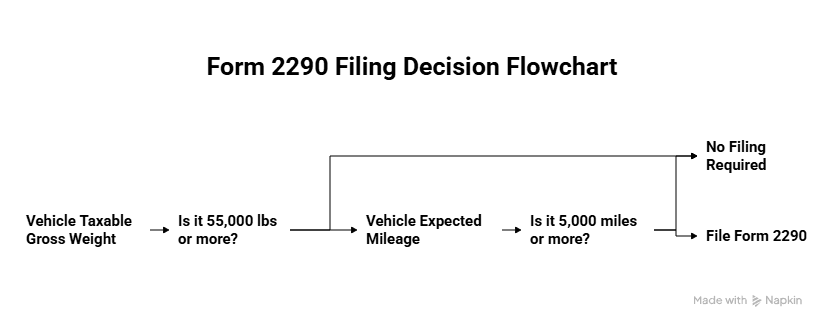
Founders managing business operations must file Form 2290 if they own or manage any highway motor vehicle that meets both criteria:
Taxable Gross Weight: The vehicle's taxable gross weight is 55,000 pounds or more.
Mileage: The vehicle is expected to be used 5,000 miles or more (7,500 miles for agricultural vehicles) during the tax period.
Key Requirements
Requirement | Details |
Tax Year | July 1 to June 30 of the following year. |
Filing Entity | The owner of the vehicle (the business or individual in whose name the vehicle is registered). |
Proof of Payment | The IRS-stamped Schedule 1—required by DMV offices for renewing vehicle registrations. |
When Form 2290 Is Due
Unlike many annual tax returns, the Form 2290 deadline is not a single date for everyone.
The Annual Filing Deadline
For vehicles used on public roads in July, the tax is due by the last day of August. This is the most common filing date for existing fleets.
The First-Use Rule
For vehicles you purchase or put into service after July, the filing deadline is the last day of the month following the month of the vehicle’s first use on public highways.
How to File Form 2290: Step-by-Step
Filing Form 2290 electronically (e-file) is the easiest, fastest, and recommended method, especially if you report 25 or more vehicles.
Step 1: Gather Vehicle and Business Information
Gather the following details for every vehicle subject to the tax:
Business EIN: Your Employer Identification Number.
VIN: The complete 17-digit Vehicle Identification Number for each taxable vehicle.
First Use Date: The exact month each vehicle was first used in the current tax period (July 1 to June 30).
Taxable Gross Weight: The precise taxable gross weight category for each vehicle.
Step 2: Complete the Main Form (Page 1)
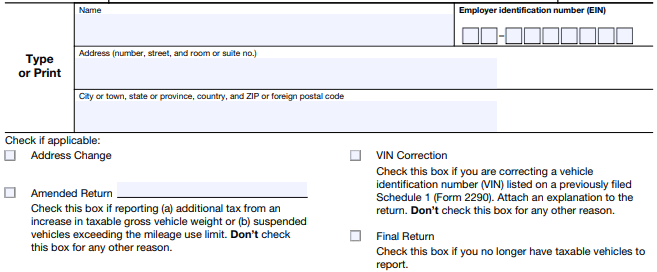
You will enter your business details and the tax period.
Box 1: Check the box if this is the first time you are filing Form 2290 for this business.
Top Section: Enter your business name, address, and EIN.
Line 1: Enter the date of the month in which the vehicle was first used during the current tax period (e.g., 07/31/2025).
Step 3: Calculate the Tax (Part II - Tax Computation)
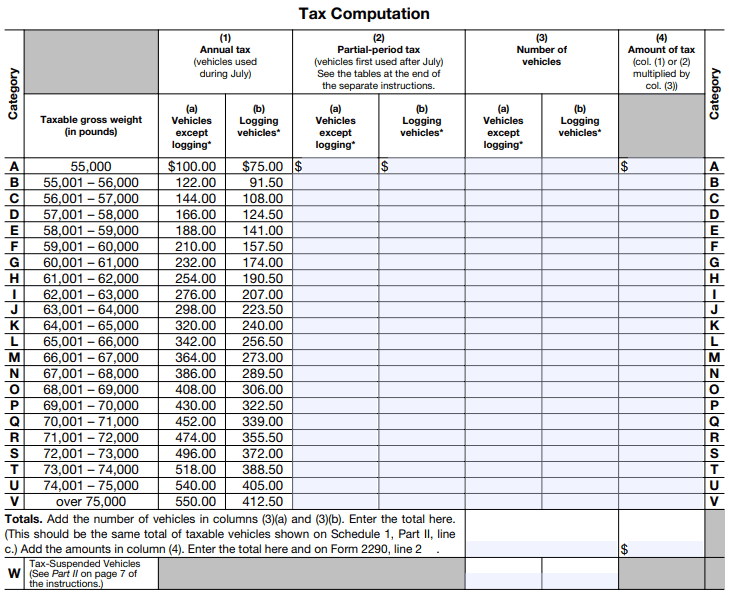
Line 2: This is the primary calculation. You must reference the IRS tax table to find the correct tax amount based on the vehicle’s taxable gross weight category.
GUIDANCE: The tax is calculated on a full-year basis for vehicles used in July. If the vehicle was first used after July, the tax is prorated for the remaining months.
Line 3: This line is used to calculate the credit for vehicles that were destroyed, stolen, or sold and not replaced during the tax period.
Line 5: This is your Total Tax Due (Line 2 minus Line 3).
Step 4: Complete Schedule 1
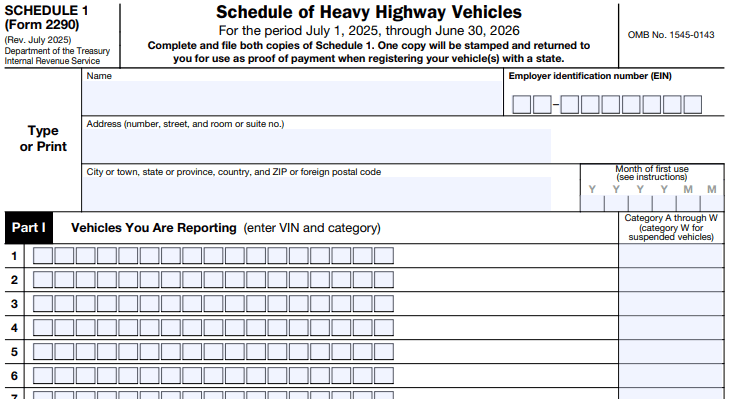
Schedule 1 is the critical attachment that lists all your vehicles and serves as your proof of payment.
You must list the VIN and the corresponding taxable gross weight category for every vehicle.
Step 5: Submit and Pay
E-file (Recommended): Use the IRS e-file system or an approved third-party provider. This method provides the stamped Schedule 1 (proof of payment) almost instantly.
Payment Options:
Electronic Funds Withdrawal: Available if e-filing.
EFTPS: Electronic Federal Tax Payment System.
Check or Money Order: Mailed with the Form 2290-V payment voucher.
Step 6: Retain the Stamped Schedule 1
GUIDANCE: Whether you file electronically or by mail, the IRS will stamp and return Schedule 1. This stamped document is your official proof of payment and is required by state DMV offices to register or renew your heavy vehicles. Store it securely in your digital records.
Common Pitfalls and How Founders Can Avoid Them
Startups managing commercial fleets often encounter errors that lead to penalties and operational hiccups.
Incorrect Gross Weight: Forgetting to combine the weight of the vehicle, trailer, and maximum load capacity. The tax is based on the maximum load capacity.
Late Filing: Missing the "last day of the month following first use" rule, especially for vehicles acquired mid-year. This immediately triggers penalties and interest.
SOLUTION: Set calendar alerts based on the first use date, not just the annual August 31 deadline.
VIN Errors: Entering an incorrect VIN. An incorrect VIN on Schedule 1 will lead to registration issues at the DMV.
SOLUTION: Double-check VINs against vehicle registration documents before submission.
Misunderstanding Part-Year Taxes: Incorrectly calculating the prorated tax for vehicles used for only part of the year.
No Proof of Payment: Losing the stamped Schedule 1. Without it, you cannot register your vehicles.
SOLUTION: Store a digital copy immediately after receiving the stamped form.
Frequently Asked Questions (FAQs)
What is the penalty for filing Form 2290 late?
The penalty is 4.5% of the total tax due, assessed for each month or part of a month the tax is past due, up to five months. Interest will also be charged.
Is there a credit for vehicles used less than 5,000 miles?
Yes. If you pay the tax but later discover the vehicle was used less than the threshold (5,000 or 7,500 miles), you can claim a refund or credit for the amount paid on your next Form 2290 filing.
Do I have to file Form 2290 if my vehicle is used less than 5,000 miles?
Yes. You still need to file Form 2290, but you will file as Tax-Suspended. This means you report the vehicle but mark it as being under the minimum use threshold, and therefore you owe no tax.
Can I apply for the R&D tax credit and file Form 2290?
Absolutely. If your startup is developing new technology related to vehicle safety, fuel efficiency, or logistics optimization, those activities may qualify for the R&D tax credit. Coordinating your Form 2290 expense records with your R&D credit claim ensures optimized deductions and cash returns.
For founders steering US startups, agencies, or e-commerce firms that rely on transportation logistics or operate commercial trucks, understanding Form 2290 is essential. This IRS form governs the Heavy Highway Vehicle Use Tax (HVUT), a critical compliance and financial requirement that directly impacts your cash flow and vehicle registration.
This guide demystifies Form 2290 filing requirements, deadlines, and best practices to help you navigate this obligation efficiently and maintain operational clarity.
What Is Form 2290 and Who Must File It?
Form 2290, officially the "Heavy Highway Vehicle Use Tax Return," is the federal form used to report and pay the Heavy Vehicle Use Tax (HVUT). The HVUT is an annual tax imposed on certain commercial vehicles operating on public highways. The revenue funds road and bridge infrastructure.
Who Must File
Founders managing business operations must file Form 2290 if they own or manage any highway motor vehicle that meets both criteria:
Taxable Gross Weight: The vehicle's taxable gross weight is 55,000 pounds or more.
Mileage: The vehicle is expected to be used 5,000 miles or more (7,500 miles for agricultural vehicles) during the tax period.
Key Requirements
Requirement | Details |
Tax Year | July 1 to June 30 of the following year. |
Filing Entity | The owner of the vehicle (the business or individual in whose name the vehicle is registered). |
Proof of Payment | The IRS-stamped Schedule 1—required by DMV offices for renewing vehicle registrations. |
When Form 2290 Is Due
Unlike many annual tax returns, the Form 2290 deadline is not a single date for everyone.
The Annual Filing Deadline
For vehicles used on public roads in July, the tax is due by the last day of August. This is the most common filing date for existing fleets.
The First-Use Rule
For vehicles you purchase or put into service after July, the filing deadline is the last day of the month following the month of the vehicle’s first use on public highways.
How to File Form 2290: Step-by-Step
Filing Form 2290 electronically (e-file) is the easiest, fastest, and recommended method, especially if you report 25 or more vehicles.
Step 1: Gather Vehicle and Business Information
Gather the following details for every vehicle subject to the tax:
Business EIN: Your Employer Identification Number.
VIN: The complete 17-digit Vehicle Identification Number for each taxable vehicle.
First Use Date: The exact month each vehicle was first used in the current tax period (July 1 to June 30).
Taxable Gross Weight: The precise taxable gross weight category for each vehicle.
Step 2: Complete the Main Form (Page 1)
You will enter your business details and the tax period.
Box 1: Check the box if this is the first time you are filing Form 2290 for this business.
Top Section: Enter your business name, address, and EIN.
Line 1: Enter the date of the month in which the vehicle was first used during the current tax period (e.g., 07/31/2025).
Step 3: Calculate the Tax (Part II - Tax Computation)
Line 2: This is the primary calculation. You must reference the IRS tax table to find the correct tax amount based on the vehicle’s taxable gross weight category.
GUIDANCE: The tax is calculated on a full-year basis for vehicles used in July. If the vehicle was first used after July, the tax is prorated for the remaining months.
Line 3: This line is used to calculate the credit for vehicles that were destroyed, stolen, or sold and not replaced during the tax period.
Line 5: This is your Total Tax Due (Line 2 minus Line 3).
Step 4: Complete Schedule 1
Schedule 1 is the critical attachment that lists all your vehicles and serves as your proof of payment.
You must list the VIN and the corresponding taxable gross weight category for every vehicle.
Step 5: Submit and Pay
E-file (Recommended): Use the IRS e-file system or an approved third-party provider. This method provides the stamped Schedule 1 (proof of payment) almost instantly.
Payment Options:
Electronic Funds Withdrawal: Available if e-filing.
EFTPS: Electronic Federal Tax Payment System.
Check or Money Order: Mailed with the Form 2290-V payment voucher.
Step 6: Retain the Stamped Schedule 1
GUIDANCE: Whether you file electronically or by mail, the IRS will stamp and return Schedule 1. This stamped document is your official proof of payment and is required by state DMV offices to register or renew your heavy vehicles. Store it securely in your digital records.
Common Pitfalls and How Founders Can Avoid Them
Startups managing commercial fleets often encounter errors that lead to penalties and operational hiccups.
Incorrect Gross Weight: Forgetting to combine the weight of the vehicle, trailer, and maximum load capacity. The tax is based on the maximum load capacity.
Late Filing: Missing the "last day of the month following first use" rule, especially for vehicles acquired mid-year. This immediately triggers penalties and interest.
SOLUTION: Set calendar alerts based on the first use date, not just the annual August 31 deadline.
VIN Errors: Entering an incorrect VIN. An incorrect VIN on Schedule 1 will lead to registration issues at the DMV.
SOLUTION: Double-check VINs against vehicle registration documents before submission.
Misunderstanding Part-Year Taxes: Incorrectly calculating the prorated tax for vehicles used for only part of the year.
No Proof of Payment: Losing the stamped Schedule 1. Without it, you cannot register your vehicles.
SOLUTION: Store a digital copy immediately after receiving the stamped form.
Frequently Asked Questions (FAQs)
What is the penalty for filing Form 2290 late?
The penalty is 4.5% of the total tax due, assessed for each month or part of a month the tax is past due, up to five months. Interest will also be charged.
Is there a credit for vehicles used less than 5,000 miles?
Yes. If you pay the tax but later discover the vehicle was used less than the threshold (5,000 or 7,500 miles), you can claim a refund or credit for the amount paid on your next Form 2290 filing.
Do I have to file Form 2290 if my vehicle is used less than 5,000 miles?
Yes. You still need to file Form 2290, but you will file as Tax-Suspended. This means you report the vehicle but mark it as being under the minimum use threshold, and therefore you owe no tax.
Can I apply for the R&D tax credit and file Form 2290?
Absolutely. If your startup is developing new technology related to vehicle safety, fuel efficiency, or logistics optimization, those activities may qualify for the R&D tax credit. Coordinating your Form 2290 expense records with your R&D credit claim ensures optimized deductions and cash returns.
This article was co-written by:
Content
This article was co-written by:
2026
© Haven All Rights Reserved
Haven is a financial technology company, not an FDIC-insured bank. Deposit account services are provided by OMB Bank, Member FDIC. Funds deposited into eligible checking and savings accounts are held at OMB Bank and may be eligible for FDIC insurance up to applicable limits. FDIC insurance protects against the failure of an FDIC-insured bank. Certain conditions must be satisfied for pass-through deposit insurance coverage to apply. Fees, terms, and conditions apply.
Cryptocurrency products and services are separate from the deposit account services provided by OMB Bank. Cryptocurrency is not offered, sponsored, endorsed, administered, held, or supported by OMB Bank. Cryptocurrency and other digital assets are not deposits, are not FDIC-insured, are not guaranteed by OMB Bank, and may lose value.
2026
© Haven All Rights Reserved
Haven is a financial technology company, not an FDIC-insured bank. Deposit account services are provided by OMB Bank, Member FDIC. Funds deposited into eligible checking and savings accounts are held at OMB Bank and may be eligible for FDIC insurance up to applicable limits. FDIC insurance protects against the failure of an FDIC-insured bank. Certain conditions must be satisfied for pass-through deposit insurance coverage to apply. Fees, terms, and conditions apply.
Cryptocurrency products and services are separate from the deposit account services provided by OMB Bank. Cryptocurrency is not offered, sponsored, endorsed, administered, held, or supported by OMB Bank. Cryptocurrency and other digital assets are not deposits, are not FDIC-insured, are not guaranteed by OMB Bank, and may lose value.
2026
© Haven All Rights Reserved
Haven is a financial technology company, not an FDIC-insured bank. Deposit account services are provided by OMB Bank, Member FDIC. Funds deposited into eligible checking and savings accounts are held at OMB Bank and may be eligible for FDIC insurance up to applicable limits. FDIC insurance protects against the failure of an FDIC-insured bank. Certain conditions must be satisfied for pass-through deposit insurance coverage to apply. Fees, terms, and conditions apply.
Cryptocurrency products and services are separate from the deposit account services provided by OMB Bank. Cryptocurrency is not offered, sponsored, endorsed, administered, held, or supported by OMB Bank. Cryptocurrency and other digital assets are not deposits, are not FDIC-insured, are not guaranteed by OMB Bank, and may lose value.