Go Back
Last Updated :
Last Updated :
Dec 5, 2025
Dec 5, 2025

How to File Form 941: Employer’s Quarterly Federal Tax Return Guide
As a founder or small business owner juggling payroll and tax filings, understanding the ins and outs of Form 941 is essential for staying compliant and avoiding costly penalties.
This guide walks you through the process clearly and pragmatically, so you can take control of your quarterly payroll tax responsibilities with confidence.
What is Form 941 and Why It Matters for Your Business
Form 941, officially the Employer’s Quarterly Federal Tax Return, is the IRS document employers use to report wages paid and payroll taxes withheld. This includes:
Federal income tax withheld from employee wages
Both the employer and employee shares of Social Security and Medicare (FICA) taxes
Adjustments like sick pay, tips, or group-term life insurance (when applicable)
Any deposits made and tax liability remaining for the quarter
Filing Form 941 is mandatory. Not only does it document your business's tax obligations, it also helps the IRS track your tax deposits for accuracy. Submitting it late or incorrectly can lead to penalties or audits — both disruptive to growth and cash flow.
Filing Timeline and Process for Form 941
Quarterly Deadlines You Must Know
Every U.S. business with paid employees must file Form 941 four times per year. Here are the quarterly periods and due dates:
Quarter | Period Covered | Due Date |
Q1 | Jan 1 – Mar 31 | April 30 |
Q2 | Apr 1 – Jun 30 | July 31 |
Q3 | Jul 1 – Sep 30 | October 31 |
Q4 | Oct 1 – Dec 31 | January 31 (following year) |
Mark these dates in your calendar or set automated reminders. Late filings typically incur fines plus interest, unless you’ve received IRS-approved extensions.
Keep in mind: even with an extension, any taxes owed should be deposited promptly to avoid penalties.
Electronic Filing vs. Paper Submission
E-filing is preferred. Why?
Fewer errors
Quicker confirmation and processing
Compatible with most payroll software
Employers can file through the IRS e-Services page at the official IRS Form 941 Information Page or via third-party software. Paper submissions are still accepted but are slower and risk processing delays.
Step-by-Step: How to Prepare and File
Here’s a simple outline to follow every quarter:
Collect Payroll Data:
Total wages paid in the period
Payroll tax withheld
Employer and employee FICA taxes
Download the Right Form:
Visit the IRS Form 941 Information Page
Use the latest form version for the correct quarter
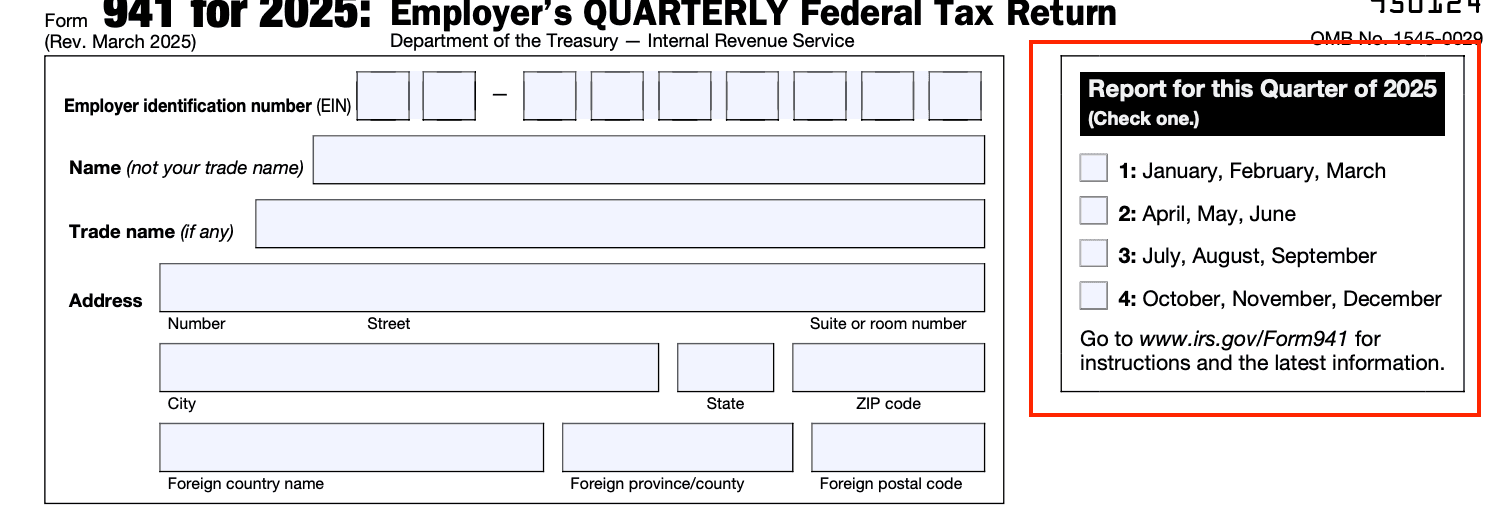
Fill Out the Form:
Identification section (name, EIN, address)
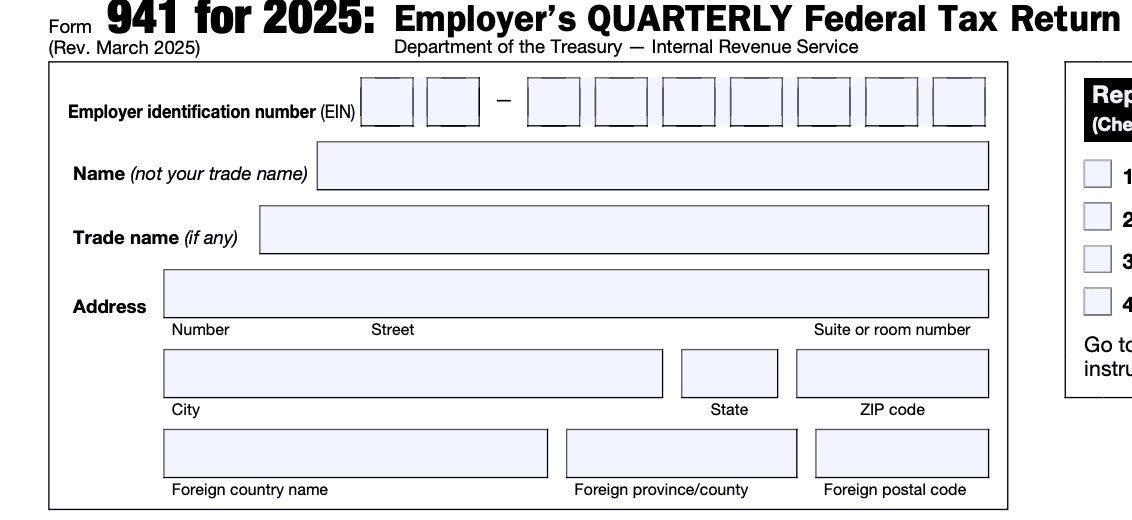
Lines for wage totals, adjustments (tips, sick pay), credits (e.g. Employee Retention Credit)
Total taxes due after deposits
Submit the Form:
Electronically, or
Mail signed hard copy to IRS service center (based on your location — the IRS provides a table)
Retain Documents:
Payroll summaries, W-2s, deposits for at least 4 years in case of audit inquiry
Want more help getting your team’s payroll started? Check out our payroll setup guide.
Tips Founders Can Use to Streamline Form 941 Filing
Filing errors lead to unnecessary costs. Avoid them by focusing on these vital steps:
1. Confirm Employee Classification
Misclassifying workers as contractors affects tax amounts and filing accuracy. Use our employee classification guide to stay compliant.
2. Keep Detailed Payroll Records
Ensure accurate entries by maintaining logs of:
Employee hours and wages
Tax withholdings
Bonuses, tips, and sick pay
3. Understand Deposit Schedules
Your deposit schedule is based on total tax liability — monthly or semi-weekly. Failure to follow your designated schedule leads to underpayment penalties. Use our deposit and calculation guide to get it right.
4. Apply Tax Credits Correctly
Credits like the Employee Retention Credit (ERC) impact Form 941. Misapplying credits or failing to include proper documentation is a red flag. Follow our ERC claiming guide to avoid mistakes.
5. Automate the Process with Smart Tools
Manual calculations increase the chance of IRS notices. Platforms like Haven help you:
Automatically track wages paid and tax owed
Generate Form 941 with the right figures
File directly and receive alerts for deadlines and errors
After Filing: What to Expect Next
Once filed, the IRS:
Processes your Form 941
Matches reported figures against deposits made
Contacts you only if inconsistencies arise
Stay responsive. If the IRS sends a notice, don’t delay. Coordinate with your accountant or payroll service to solve the issue quickly. Most problems result from calculation or deposit mismatches — solvable with clear records.
How Haven Helps Founders File Form 941 Seamlessly
Payroll tax filing shouldn’t be a burden. At Haven, we’ve built tools specifically to help small businesses and startups stay compliant with less effort. Our platform:
Anchors your verified business identity with correct EIN and company data
Automates preparation and filing of IRS forms, including Form 941
Sends real-time alerts for deadlines and possible filing errors
Offers resources legible to founders, not just accountants
Minimize risk. Save time. Stay focused on growth.
Explore our pricing and service tiers to find the payroll tax solution that fits your business.
Staying Compliant with Form 941
Filing Form 941 is more than a quarterly task — it’s a key part of tax compliance that protects your business from avoidable penalties. Here’s what to focus on:
Mark critical quarterly deadlines
Maintain exact payroll and deposit records
Use available credits responsibly
Automate wherever possible to reduce errors
For the official IRS instructions and downloads, visit the IRS Form 941 page.
By filing on time and accurately, you secure your business’s tax standing each quarter — and preserve your ability to grow confidently.
As a founder or small business owner juggling payroll and tax filings, understanding the ins and outs of Form 941 is essential for staying compliant and avoiding costly penalties.
This guide walks you through the process clearly and pragmatically, so you can take control of your quarterly payroll tax responsibilities with confidence.
What is Form 941 and Why It Matters for Your Business
Form 941, officially the Employer’s Quarterly Federal Tax Return, is the IRS document employers use to report wages paid and payroll taxes withheld. This includes:
Federal income tax withheld from employee wages
Both the employer and employee shares of Social Security and Medicare (FICA) taxes
Adjustments like sick pay, tips, or group-term life insurance (when applicable)
Any deposits made and tax liability remaining for the quarter
Filing Form 941 is mandatory. Not only does it document your business's tax obligations, it also helps the IRS track your tax deposits for accuracy. Submitting it late or incorrectly can lead to penalties or audits — both disruptive to growth and cash flow.
Filing Timeline and Process for Form 941
Quarterly Deadlines You Must Know
Every U.S. business with paid employees must file Form 941 four times per year. Here are the quarterly periods and due dates:
Quarter | Period Covered | Due Date |
Q1 | Jan 1 – Mar 31 | April 30 |
Q2 | Apr 1 – Jun 30 | July 31 |
Q3 | Jul 1 – Sep 30 | October 31 |
Q4 | Oct 1 – Dec 31 | January 31 (following year) |
Mark these dates in your calendar or set automated reminders. Late filings typically incur fines plus interest, unless you’ve received IRS-approved extensions.
Keep in mind: even with an extension, any taxes owed should be deposited promptly to avoid penalties.
Electronic Filing vs. Paper Submission
E-filing is preferred. Why?
Fewer errors
Quicker confirmation and processing
Compatible with most payroll software
Employers can file through the IRS e-Services page at the official IRS Form 941 Information Page or via third-party software. Paper submissions are still accepted but are slower and risk processing delays.
Step-by-Step: How to Prepare and File
Here’s a simple outline to follow every quarter:
Collect Payroll Data:
Total wages paid in the period
Payroll tax withheld
Employer and employee FICA taxes
Download the Right Form:
Visit the IRS Form 941 Information Page
Use the latest form version for the correct quarter
Fill Out the Form:
Identification section (name, EIN, address)
Lines for wage totals, adjustments (tips, sick pay), credits (e.g. Employee Retention Credit)
Total taxes due after deposits
Submit the Form:
Electronically, or
Mail signed hard copy to IRS service center (based on your location — the IRS provides a table)
Retain Documents:
Payroll summaries, W-2s, deposits for at least 4 years in case of audit inquiry
Want more help getting your team’s payroll started? Check out our payroll setup guide.
Tips Founders Can Use to Streamline Form 941 Filing
Filing errors lead to unnecessary costs. Avoid them by focusing on these vital steps:
1. Confirm Employee Classification
Misclassifying workers as contractors affects tax amounts and filing accuracy. Use our employee classification guide to stay compliant.
2. Keep Detailed Payroll Records
Ensure accurate entries by maintaining logs of:
Employee hours and wages
Tax withholdings
Bonuses, tips, and sick pay
3. Understand Deposit Schedules
Your deposit schedule is based on total tax liability — monthly or semi-weekly. Failure to follow your designated schedule leads to underpayment penalties. Use our deposit and calculation guide to get it right.
4. Apply Tax Credits Correctly
Credits like the Employee Retention Credit (ERC) impact Form 941. Misapplying credits or failing to include proper documentation is a red flag. Follow our ERC claiming guide to avoid mistakes.
5. Automate the Process with Smart Tools
Manual calculations increase the chance of IRS notices. Platforms like Haven help you:
Automatically track wages paid and tax owed
Generate Form 941 with the right figures
File directly and receive alerts for deadlines and errors
After Filing: What to Expect Next
Once filed, the IRS:
Processes your Form 941
Matches reported figures against deposits made
Contacts you only if inconsistencies arise
Stay responsive. If the IRS sends a notice, don’t delay. Coordinate with your accountant or payroll service to solve the issue quickly. Most problems result from calculation or deposit mismatches — solvable with clear records.
How Haven Helps Founders File Form 941 Seamlessly
Payroll tax filing shouldn’t be a burden. At Haven, we’ve built tools specifically to help small businesses and startups stay compliant with less effort. Our platform:
Anchors your verified business identity with correct EIN and company data
Automates preparation and filing of IRS forms, including Form 941
Sends real-time alerts for deadlines and possible filing errors
Offers resources legible to founders, not just accountants
Minimize risk. Save time. Stay focused on growth.
Explore our pricing and service tiers to find the payroll tax solution that fits your business.
Staying Compliant with Form 941
Filing Form 941 is more than a quarterly task — it’s a key part of tax compliance that protects your business from avoidable penalties. Here’s what to focus on:
Mark critical quarterly deadlines
Maintain exact payroll and deposit records
Use available credits responsibly
Automate wherever possible to reduce errors
For the official IRS instructions and downloads, visit the IRS Form 941 page.
By filing on time and accurately, you secure your business’s tax standing each quarter — and preserve your ability to grow confidently.
This article was co-written by:
Content
This article was co-written by:
2026
© Haven All Rights Reserved
Haven is a financial technology company, not an FDIC-insured bank. Banking services are provided by OMB Bank, Member FDIC. Deposits in checking and savings accounts are held at OMB Bank and are insured by the FDIC up to the applicable limits. FDIC insurance covers the failure of an insured bank. Certain conditions must be met for pass-through insurance coverage to apply. Fees, terms, and conditions apply to depositing and using your account.
2026
© Haven All Rights Reserved
Haven is a financial technology company, not an FDIC-insured bank. Banking services are provided by OMB Bank, Member FDIC. Deposits in checking and savings accounts are held at OMB Bank and are insured by the FDIC up to the applicable limits. FDIC insurance covers the failure of an insured bank. Certain conditions must be met for pass-through insurance coverage to apply. Fees, terms, and conditions apply to depositing and using your account.
2026
© Haven All Rights Reserved
Haven is a financial technology company, not an FDIC-insured bank. Banking services are provided by OMB Bank, Member FDIC. Deposits in checking and savings accounts are held at OMB Bank and are insured by the FDIC up to the applicable limits. FDIC insurance covers the failure of an insured bank. Certain conditions must be met for pass-through insurance coverage to apply. Fees, terms, and conditions apply to depositing and using your account.